Client Challenge
Adaptive Case Management is a progression from the initiation of a case to its final resolution. Typically, even a simple process also has to be integrated with the database, database tables, inbound and outbound business communication (CRM/ECM), case rule definitions and time-stamped materials from case history or pending communications. Certainly, document content, collaborative decision-making and customer interactions are important elements of case management. A large portion of case-related information is received and managed in the form of business documents rather than structured data.
Cases often take too long to complete, from the standpoints of both the customer and the operations team, due to a number of internal factors:
- Resources
- Information is misplaced
- No standardization
- Difficulty of enforcing compliance with policies, regulation, and best practices
- Lack of visibility into key performance indicators at individual case level (real time) or in the aggregate (historical trends)
In case management, human judgment, external events and business rules don’t merely determine a path through a predefined diagram. Some tasks and processes to complete the case may be defined in advance through the case template, but ad-hoc tasks are a critical distinguishing element of case management, often related to creating, obtaining, reviewing, and approving documents and some representing conventional processes involving multiple participants.
Offer Description
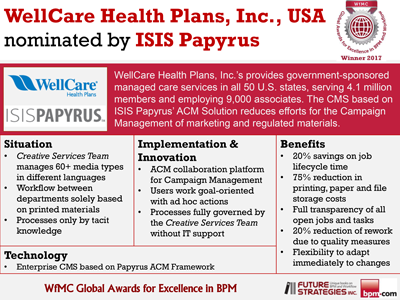
Papyrus Adaptive Case Management includes a complete document management system, a comprehensive facility for creating, capturing, indexing, storing, finding, viewing, sharing, editing, versioning and retaining a wide variety of document types. To ensure both compliance and flexibility, Papyrus Adaptive Case Management can apply rules to document events for automation and case status tracking at any point in the process, including required predefined tasks and documents via the case template and also allowing the addition of ad–hoc activity and content at runtime.
Rather than routing the case folder to the next task sequentially down the line, Papyrus Adaptive Case Management instead advances through both external and internal events:
- For external events such as receipt of a phone call, letter, fax, or e-mail related to the case, the message content is added to the case folder and new tasks or processes may be created.
- For internal events such as assignments and business rules, case workers assign tasks and initiate processes as needed to work on the case, and business rules within the case may automatically create and assign tasks or trigger fully automated actions based on either external events, completion of other case tasks, or expiration of task deadlines.
- Those tasks and activities define the case context and are visible, along with case documents, in the shared case folder, where the state of the case as a whole is determined by the combined state of all tasks and documents.
The strength of Papyrus Adaptive Case Management is an integrated end-to-end solution combining data, business processes & rules, document creation, capture and output management with support for Dynamic Business Process Management in a single platform.
Papyrus Adaptive Case Management
with integrated inbound and outbound correspondence (click image to zoom) |
With Papyrus Adaptive Case Management, a case is not simply a collection of isolated activities, processes and documents, but a single and evolving entity progressing toward completion. Represented by the case folder, the case as a whole is easily understood through simple review of the unified and customized view that summarizes the status and provides access to key content and details.
Administrator
Overview (click image to zoom) |
Personal
Task List / Activity List with status information (click image to zoom) |
Case
Check lists (click image to zoom) |
Calendar
view (click image to zoom) |
Value Delivered
Key Benefits/Value
- Single, integrated communication & process platform is state- and event-driven and rule-based (data-driven)
- Holistic customer view for end-to-end case management
- Out-of-the-box shared case folder with different views based on case status and user
- Closes the loop with integration of inbound and outbound communication for full-circle response
- Collaborative process for transparency and efficiency
- Secure team access to case information
- Single point of access to all information
- Reduced data entry errors
- Efficient, centralized output management
- Interface with all business applications and legacy systems
- Any document type or object can be added to the case
- All cases centrally stored
- Enhanced consistency and compliance with internal and external regulations
- Flexibility for automation of all processes and future business changes
- Archiving with retention policies
- Increased operational performance and results
- Optimization of case worker’s time
- Increased efficiency in time to market
- Reduced implementation, maintenance and development costs
- Reduced manual operations and minimal duplication of documents and data
Key Features
- Shared case folder available to authorized users working on the case subject to specific security and access control rules
- User authorization and authentication
- Auditing
- Change management, digital signature, versioning, variant control
- Support for collaboration - chat, e-mail, phone
- Real-time access to common case data, documents and activity
- Activities, to-do’s, check lists
- Calendar
- Inbound and outbound communications
- Tasks with priority and deadlines
- Customizable views can include different information, such as
- Form showing case data or content
- Tasks history
- Discussions
- Dashboard
- Automatic process discovery and implementation in real time (UTA & Activity recorder)
- The Activity Recorder/Player supports the employee with repetitive tasks, minimizes user interaction and reduces errors
- Recorded activities can be reused
- User Trained Agent supports employee decision-making, learning from observed patterns
- Classification and extraction of data of inbound mail, fax and emails
- Integrated outbound correspondence system
- Generate and respond to letters, cancellations and claims
- Access through browser or fat client interfaces
- o Accessible to clerks, sales, business partners and customers
- Business application and legacy system integration
- Wide range of Adapters and Typemanager interfaces
- Comprehensive document and object support - MS Office, SMS, chat session, wiki pages, HTML, XML, PDF, audio, video, CAD CAM, X-ray, photos, etc.
- Long-term archiving of the case and its content with retention policies
- Monitoring tools and views suitable for reactive or proactive approach
| Case contains inbound and outbound correspondence (click image to zoom) | Inbound document: hand written, scanned (click image to zoom) | Create
outbound document (click image to zoom) |
Product
Configuration |
Inbound:
Outbound:
|
Optional
Components: |
|
Client Challenge
Manufacturing and trade organizations have high volumes of varying goods delivered by many different suppliers. They need to manage, control, monitor and automize processes from the point of entering an order to delivery and payment. Optimization potentials to increase efficiency are:
- Significant reduction of manual classification of incoming paper, email or fax documents, such as invoices and bills, delivery notes, work confirmations, orders and credit notes
- Consolidating departmental requirements for access to volume discounts, minimum order quantities and shipping efficiencies
- Monitoring of actual goods received to shrink expenses that reduce margins due to missing goods in the delivery
- Preventing payment duplication or billing for incomplete shipped orders
- Compliance with manufacturing or trade-based completion deadlines and supply chain management
Value Delivered/Characteristics
- ROI potential within 12-18 months
- Self-learning system optimizes automatic classification to nearly 100% for incoming invoices on paper/fax/email attachment
- Fast implementation of processes – lower cost of ownership
- Enterprise solution - enables consolidation and high personalization
- Strong integration with legacy, ERP, CRM, ECM and Web-distributed solutions and mobile communications (iPhone, BlackBerry)
- Integrated, end-to-end straight through processing (STP) of inbound and outbound business communication
- Platform and output channel independence
- Control of payment terms and discount opportunities
- Reduced cost - dispute management, monitoring of goods received and payment stops
- Empowering business users - increased productivity
- Integrated security and authorization
- Multilingual documents and GUI support
Offer Description
The business application covers the core P2P process requirements, while being highly customizable by definition, from order entry in operations (manufacturing or stock) to order processing in purchasing. Rules and processes are defined in the Papyrus Desktop and executed by the system ensuring compliance of purchase policies, e.g., approval of orders or payment stop due to undelivered goods.
| An order from operations is to be approved by a supervisor, triggering the purchase department to process the order for fulfillment, delivery and final payment. | A partial delivery is recognized and a payment stop is automatically placed. The payment stop can be manually removed by the purchase department for situations involving special negotiated conditions (e.g., prepayment of goods). |
Characteristics:
Highly automated process offering process agility
and flexibility
- Direct entry of requisition orders in a form
- Automated and multi-lingual reading of delivery notes and invoices with OCR/ICR including manual correction mask
- Reduced manual steps in the process (“date of goods receipt”, “date of invoice received” and “cost center” can be captured digitally)
- Deposited rules trigger workflows, e.g., approved requisition order allows purchasing to process order payment and fulfillment
- Dispute management: follow up of missing goods to reduce expenses
-
Closed-loop, self-learning
processes in the system enable continuous
improvement
- Integration with ERP system, i.e., SAP producing outgoing bills with the same system
Additional capabilities
- “Order to Cash”, Mobile device connectivity
- Automated Customer Response Management (incoming request/outgoing response)
Product Configuration |
|
Client Challenge
Among the top three customer complaints against insurance companies is always claims processing delays. Despite scanning and electronically archiving their incoming communications, many insurance providers are still working with departmental dossiers that are not readily accessible across the organization, resulting in loss or duplication of documents, unauthorized access to confidential and private information and insufficient status updates. Simply locating and gaining access to these separate paper or electronic dossiers can take hours or days, impacting the integrity and speed of claim processing.
With a growing universal trend toward integration
and collaboration to maintain a single view of
the customer, insurance companies face diverse
challenges in sharing and accessing real-time
case/customer information, activity and events
in one place to quickly and efficiently resolve
a case.
Enabling collaboration of knowledge workers and
external experts on a claim and granting access
(temporarily) to certain documents are also vital
to complete critical tasks and processes. Working
from the office, a VPN, the Web or mobile devices,
claims management teams must securely access
stored information, complete forms and upload
data and documents to keep the claims process
moving ahead efficiently and accurately.
Collaborative claims systems must also ensure compliance with internal policies and protocols, as well as external regulations and legislation, leading to a requirement for audit trails on the participants, timing, data and specific workflow of any given claim activity.
Offer Description
Achieving a single customer view requires implementing a system to enable capturing, creating and managing case documents, accessing and routing these documents, recording them and triggering activity related to them. Papyrus Claims Management includes a complete document management system with a comprehensive facility for creating, capturing, indexing, storing, finding, viewing, sharing, editing, versioning and retaining a wide variety of document types.
Claims Process Overview - Liability case example:
- Distributed scanning and classification of incoming mail
- Recognition of incoming information to associate documents with existing claim file or trigger creation of new claim file
- Incoming and outgoing case-relevant documents saved and stored to virtual liability case file (e-mails, photos, reports, legal/court documents)
- Automatic or manual updates to case file overview, status and checklist with latest activity and data
- Optimization of liability process using business rules, ad-hoc activity and user-trained agent
- Integrated letter writing (cancellation letter, notification of claim, etc.) in a browser or fat client application for the claim worker and insurance agent
- Efficient central output management for all case-related correspondence
The knowledge worker uses Papyrus Intuitive Business Layouter to describe its claims process in the company’s own business terms, applying documents as input and output to tasks and to control the boundaries of the process using business rules. Without programming the knowledge worker can upload documents, images, photos or create a new document using pre-defined and classified document templates during the lifecycle of the case, as well as define ad-hoc tasks and assign those to claim workers.
Tasks and activities define the case context and are visible along with case documents in the shared claims folder, where the status of the claim as a whole is determined by the combined state of all tasks and documents. Papyrus also offers monitoring on the claim and task level as well review of the case history, giving the responsible manager worker full control of and insight to performance and quality in servicing the claim.
To ensure both compliance and flexibility, Papyrus Claims Management can apply rules to document events for automation and case status tracking at any point in the process, including required predefined tasks and documents via the case template and also allowing the addition of ad–hoc activity and content at runtime.
The strength of Papyrus Claims Management is an integrated end-to-end solution combining data, business processes and rules, document creation, capture and output management with support for Dynamic Business Process Management in a single platform.
Value Delivered
Key Benefits/Value
- Single communication & process platform is state- and event-driven and rule-based
- Holistic customer view for end-to-end claims management
- Out-of-the-box shared claim folder with different views based on claim status and user
- Closes the loop with integration of inbound and outbound communication for full-circle response
- Collaborative process for transparency and efficiency
- Secure team access to claim and customer information
- Single point of access to all information
- Capture and classification of incoming mail
- Reduced data entry errors
- Efficient, centralized output management
- Interface with all business applications and legacy systems
- Any document type or object can be added to the claim
- All claims centrally stored
- Enhanced consistency and compliance with internal and external regulations
- Flexibility for automation of all processes and future business changes
- Archiving with retention policies
- Multi-language support
- Increased operational performance and results
- Optimization of knowledge worker’s time
- Increased efficiency in time to closure
- Reduced implementation, maintenance and development costs
- Reduced manual operations and minimal duplication of documents and data
Key Features
- Collaborative platform for claims resolution.Shared case folder available to authorized users working on the case subject to specific security and access control rules
- User authorization and authentication for selective access to experts
- Status and task monitoring for auditing
- Change management, digital signature, versioning, variant control
- Support for collaboration - chat, e-mail, phone
- Real-time access to common claim data, documents and activity
- Activities, to-do’s, check lists
- Calendar
- Inbound and outbound communications
- Tasks with priority and deadlines
- Service tasks that perform automatic operations (send email, print, archive, call a Webservice, initiate another process)
- Viewing and printing outgoing and incoming documents = based on authorization
- Support for offline work and mobile platforms without additional programming
- Process description in company’s business terms
- Business Process Management Notation 2.2 support
- Applying documents as input and output to tasks
- Control of process boundaries using business rules
- Monitoring tools and views suitable for reactive or proactive approach
- On-the-fly definition of ad-hoc tasks and assignment to claim workers
- Integrated processing of inbound communications
- Classification and extraction of data from incoming forms, mail, fax and emails
- Uploading documents, images, photos
- Integrated outbound correspondence system
- Integrated letter writing in desktop and browser with full word processing capabilities, including with spell check and hyphenation in many languages
- Pre-defined and classified document templates
- Generate and respond to letters, cancellations and claims
- Access through browser or fat client interfaces
- Accessible to knowledge workers, managers, sales team, business partners and customers
- Customizable views can include different information, such as
- Form showing claim data or content
- Tasks history
- Checklists
- Discussions
- Dashboard
- Automatic process discovery and implementation in real time (UTA/Activity recorder)
- Activity Recorder/Player supports the knowledge worker with repetitive tasks, minimizes user interaction and reduces errors
- Recorded activities can be reused
- User Trained Agent supports employee decision-making, learning from observed patterns
- Business application and legacy system integration
- Wide range of Adapters and Typemanager interfaces
- Comprehensive document and object support - MS Office, SMS, chat session, wiki pages, HTML, XML, PDF, audio, video, CAD CAM, X-ray, photos, etc.
- Long-term archiving of the case and its content with retention policies
Product
Configuration: |
|
• Inbound |
|
Optional Components:
|
|
Customer Response Management
Client Challenge
As incoming business mail, such as a claim, enters through multiple channels, browser-based access to all customer records and business correspondence is essential for timely and relevant responses.
- Manual processing is minimized through automatic classification and extraction of vital information from incoming mail (paper, fax and e-mail messages).
- Automatic routing based on business rules to a user department enables customer care staff to generate an automatic or user-interactive response based on user authorization.
- Document status, clerk activity monitoring, response time/date tracking by service code and auditing help ensure timely reaction and consistent improvements to customer service.
- Generated personalized response letters must be compliant with corporate design, look and feel, using corporate templates, fonts and forms and optional electronic or centralized print-and-mail delivery.
Offer Description
The Papyrus Response Management Solution receives and classifies inbound customer correspondence, extracts data content and routes - all based on the defined process and depending on business rules to user departments (customer care, sales) - for timely, relevant and accurate response.
- Extracted data is stored in a CRM database
- An individual response using customer and business data is created immediately, minimizing manual processing by automatic or semi-automatic creation of letters
-
Papyrus Business Correspondence
functionality enables staff to create and modify
outgoing letters and e-mails using the integrated
output management for optimized print and mail
The
Papyrus Response Management solution offers
one integrated, user-friendly GUI (Papyrus
EYE) for viewing and working with inbound and
outbound correspondence. |
|
Value Delivered
Key Benefits/Value
- Entire incoming and outgoing correspondence process is automated, standardized and streamlined
- Minimized manual processing via automatic classification and extraction of virtual information
- Automatic routing to a business department or user executing defined business rules
- Tracking and management reporting of all contacts and communications
- No integration effort - Papyrus is already integrated end to end (inbound/outbound)
- Timely and consistent response to customer inquiries
- Support for policy and regulatory compliance
Key Features
- Multiple channels supported
- Inbound - paper, fax, e-mail, Web, SOAP
- Output by selection - print, Web, fax, e-mail
- Self-learning technology ensures that all types of documents can be classified
- Fuzzy matching to find the correct customer data in the database
- Validation and manual correction
- Integrated security (user authorization, data encryption, auditing, digital signature)
- Automated system response or user-interactive personalized response
- Robust correspondence functionality
- Text editing, spell check, multiple languages
- Templates, building block reuse, tables
- Rules, variable insert
- Full WYSIWYG layout, view and print
- Multiple clerks can create a consolidated letter for supervisor sign off/approval
- Flexible integration with CRM systems providing standard Adapters and Typemanagers
Product
Configuration |
Optional: |
|

Adaptive
Case Management:
Empower Knowledge Workers
Inbound
Mail Processing

Document
Capture Solution
Enterprise
Content Management
Turning
Green into Gold -