TECHNOLOGY INNOVATION - INBOUND MAIL PROCESSING |
Inbound
Mail Processing
Intelligent Classification and Automated
Distribution
ISIS Papyrus enables your incoming mail to flow:
E Automates the data enrichment of all documents
E Reduces throughput times and acquisition effort
E Provides relevant information earlier and more completely
E Preserve in a secure WebArchive and retrieved quickly
E A Complete solution for efficient Capture and agile Case Management
Receive Mail & Capture workflow
Customer Case documents are received by
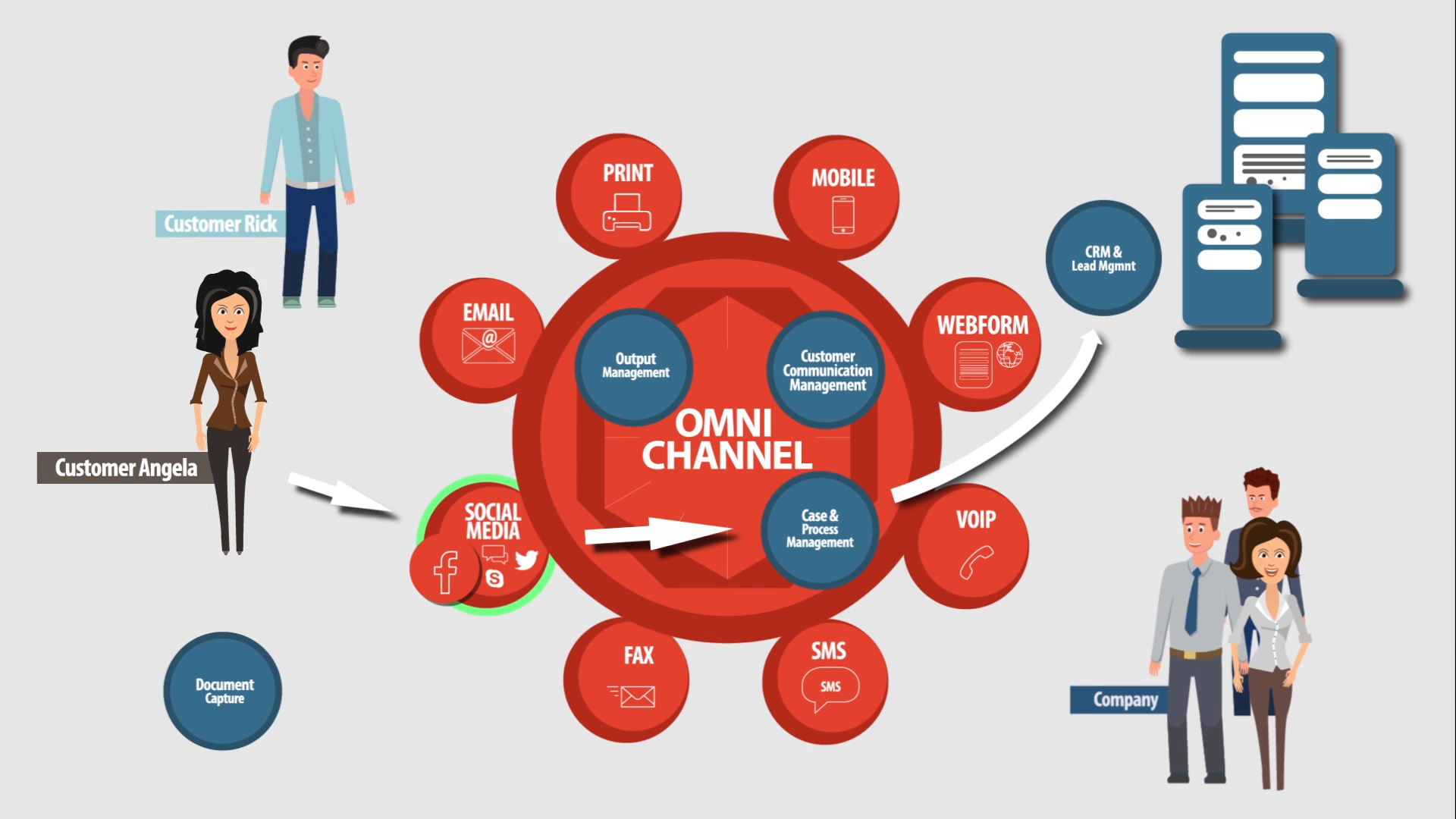
L Mail L Fax L E-mail L Web L SOAP
Studies have found that up to 75% of all documents received and manually keyed into a data collection system contain some type of error. However, the ISIS Papyrus Capture solution automates document processing with speed and accuracy, regardless of the input method. Papyrus Capture can meet all of your corporate inbound document requirements without the need for complex programming.
Incoming Mail/Scanning
Case documents are often received as paper documents which Papyrus Capture then transforms into business critical information. They are scanned, digitally signed and encrypted to secure the data.
Visual quality control, batch image optimization, and automated indexing technologies such as barcode and/or OCR with zonal recognition are all part of the Papyrus solution.
Incoming Faxes
Papyrus Fax Server set ups in remote offices enable fax documents to be scanned and indexed directly at the source then shared as appropriate throughout the organization based upon roles and privileges.
Incoming E-mails
For e-mails, neural network functionality is used to compare similarities and differences with incoming e-mails and those stored in the domain knowledge-base that’s built up by examples. Words and phrases are used to classify an e-mail, and not just those in the subject line. This is approximately 10 times quicker then OCR recognition.
Web Response
Papyrus software also allows for a Web application where customers fill out HTML response forms. These are captured with the Papyrus HTTP Adapter and processed accordingly.
SOAP Application Message
A SOAP message can be used to communicate information from a 3rd party application server, JAVA application, Web Portal or any other WebServices enabled system. The extracted information can be compared to existing databases to ensure accuracy.
Gains achieved
Transparency of collecting documents electronically, no matter whether document scanner, MFPs, cheque or network , scanner
Uniform operating with TWAIN driver, Pixtrans/ISIS and -Papyrus low level driver
Using many extra features like imprinting, dual stream images and soft dropout color
Automation by Recognition: Extract/Index & Categorize
Recognition of all inbound Communication
With the variety of documents that arrive daily at a company the need to quickly process and forward them to the right department is paramount. Therefore, the development and operation of a capture system must be independent of document types, input hardware and operating system. But in order to achieve the afore mentioned result, large banks, insurance companies, government organizations, industry and service corporations all require fast development, elimination of programming effort and operating system and scanner independence; all of this is inherent in the Papyrus Inbound Concept.
Self-learning Classification Process
The Papyrus Capture classification methodology is independent of document type because the categorizer is typically trained through the use of examples. From this input the classification process learns specific similarities and distinctive differences. Self-learning technology ensures that all types of documents can be classified based on properties, keywords and rules.
As for the documents that could not be classified correctly, constant fine-tuning is possible whilst Papyrus Capture runs in real time. This ensures continuous optimization of Papyrus Classify and enables flexible adjustment of the rules based on the changes in the received documents that have to be processed.
Benefits achieved
Significant reduction of manual data entry
Higher data quality
Reliable and reproducible results
Language independent processing
Intelligent Extraction Process
Based on advanced OCR/ICR (a combination of ISIS’ own development and a market leader engine), printed and handwritten documents can be analyzed and data fields of interest automatically extracted irrespective of whether the position on the page is known or not. Immediate Fuzzy-logic based matching uses calculations to assess the probability of the contents of a predefined data field for dramatically improved results.
Papyrus FixForm uses four OCR/ICR engines with advanced image preprocessing for improved document recognition. It provides indexing and processing of data extracted from known forms on predefined document positions. Manifold parameterization and post processing text filter functions enable best possible recognition automation.
Papyrus FreeForm® automatically recognizes scanned but unsorted business documents of unknown structure and layout. The system also recognizes unstructured or poorly structured documents with great reliability and is capable of processing any kind of business case document, such as correspondence, invoices, copied forms, job applications, and many more.
Optimize by Validate & Verify
Exception handling
In the uncommon event that automatic classification is not successful the document is routed for manual classification and is displayed automatically for visual classification. The document is then flagged and can be routed to a supervisor’s inbox for further verification. Self-learning technology ensures that all types of documents can be classified.
Data entry staff that are given ”Correction and Verification” duties need only to deal with rejected character reads or those failing the plausibility checks. Ensuring maximum data integrity, the validation data and contextual information used for plausibility checks are retained within SQL-databases (e.g. DB2, Oracle, SQL Server, etc.).
Should a situation arise where the document cannot be corrected or verified immediately, such as what might occur if a customer care representative needs to respond, then the document is placed into a suspended state and forwarded to an exception item workstation or to a manual process for on-going processing.
Papyrus Client/Capture is the browser-based or thick client end-user interface for all user interactions within a inbound mail capture system. It enables the completion, correction and classification of inbound documents along with full GUI functionality for the displaying of documents and manual validation. Other features include:
Uniform handling of scans, faxes and e-mails
Context aware editable fields for data entry
Interactive verification of recognized data
Image display of snippets or whole pages
Free message text and user hints
Data masks for accessing all administrator and even designer functions.
Customized “Document Workplace” that can handle extended requirements for manual input processing such as rearranging the sequence of sheets or exchanging pages within documents.
Highlights
Modern look graphical conglomerate of VISTA/Mac-X but operating system independent
Same definition for Web and Desktop
Extremely flexible and user definable
GUI definition without Programming:
NO extra GUI Designer tools required
NO HTML and PPL knowledge required
NO Java Programming
NO Process code in the Layout
NO XML/XSL/XSLT description required
CLEAR distinction between LAYOUT and CONTENT
Handling of TIFF, multipage TIFF, AFP, JPG and PDF …
Freely customizable arrangement of document list, data and images
Color highlighting of important regions rejected/suspicious characters
Tree & Thumbnail lists of documents to allow quick overview
On-line validation with selection list for values allowed
Benefits
THREE ways to access: Portal–Browser, Terminal Server, Desktop – with ONE definition
Seamless display all types of processed inbound documents
Ergonomic flexible screen designs – Papyrus Eye
Customizable without the need for programming
Case Study:
Telecom
The Customer
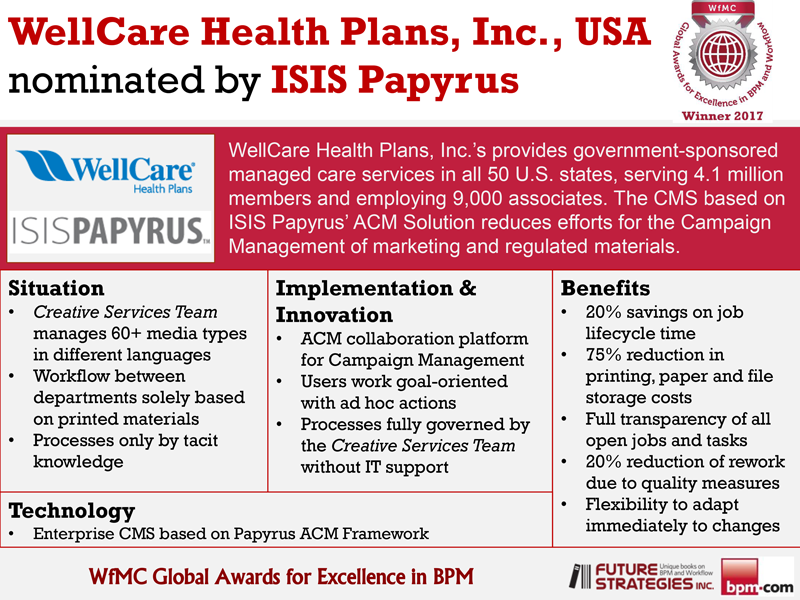
The Telekom Austria group is Austria’s leading provider of telecommunication services in both stationary and mobile networks.
The Requirements
In order to meet the demands of an increasingly competitive marketplace, Telekom Austria restructured its case management operations to expand service offerings. These included centralizing its processing throughout Austria, and higher automation of the incoming mail. However, the transactions relating to services such as installing new telephone lines, changing of telephone numbers, issuing invoices, or changes in tariffs, typically involve information interaction with its customers via paper or E-mail.
In the case of Telekom Austria, the content of more than 10,000 letter and fax documents daily including returns of marketing campaigns, needed to be distributed fast and reliably to the appropriate departments within the organization for ongoing processing. This demanded a well integrated solution capable of high levels of automation, accurate distribution of documents, and the rapid introduction of new document types.
The Concept
Telekom Austria’s scan center in Vienna was chosen as the centralized distribution point for all the incoming mail. The entire process involving customer correspondence required re-structuring, from the digitalization of incoming data (e.g. customer mail and business documents) through long-term archiving of information with fast and transparent data access available, on demand, at the desktop.
ISIS Papyrus offered a solution based upon Papyrus Capture products that created a transparent portal between the incoming paper documents and the digital information resident within the system’s domain. The implementation of Papyrus Capture also provided the basis for the introduction of further case management workflow at Telekom Austria.
The Solution
Two high volume scanners process the huge daily volume with the automatic document sorting and information extraction being performed by Papyrus Capture. Unstructured mail and documents are classified by the FreeForm® subsystem, and the index information is automatically extracted.
Highlights
Accepts all document types
Powerful design tools that simplify the definition of new document types and extensive use of supervised “machine learn by example” techniques
Smooth permanent system enhancements with minimal disruption to the operation
From the initial 30 forms the system has expanded significantly and is currently handling in excess of more than 100 document types, forms, all invoices, customer letters etc.
The customer’s mail is typically distributed to the designated case management personnel throughout Austria within maximum 4 hours after being received
High automation rates reached (up to > 98%, depending on document type)
Decision Criteria
Capable of processing large daily volumes with high accuracy
Intuitive and productive user interfacing during the data completion process (Verification Module)
Improved performance benefits (number of documents per employee hour)
A flexible and comprehensive design environment to readily adapt the system for new tasks
Easy integration to SAP, Host, CRM (Clarify), SQL Customer database
In their own words...
“Having learned to use the new tool and successfully integrated the capture system into our existing systems we obtained a high level of transparency, which not only achieved new processing targets but also improved our customer’s perception and, hence, improved acceptance of our products.”
Klaus Ambros
Telekom Austria AG
MOTIVATIONS for INNOVATIONS
Motivation: Increase responsiveness and thus customer satisfaction
Innovation: Homogeneous and central handling of all types of inbound mail
Solution: Papyrus Capture System for maximum document automation
WebArchive - Electronic Originals
Short Term and Long Term Archiving
Multiple WebArchive servers perform the long-term and short-term archiving onto the media of your choice. Storage management attributes for each object ensure that it is automatically archived as soon as it reaches the appropriate state. There are no archive runs or conversions that are necessary and if the process requires proof of originality and authenticity then the archived items can be digitally signed at any point in the process.
A WebArchive can consist of any number of servers and can either use its own index or an external DB index. BLOBS can be stored natively on disk where they can then be subsequently stored and retrieved from/to a third party archive, or some external database. Furthermore, a WebArchive is not dependent on any particular hardware.
e-document Delivery and Customer Care Web Access
One or more WebPortal servers can be deployed to supply the Papyrus Eye FLASH user interface or alternatively each user can work on their own node using a PC. Dynamically created from definitions in the repository and not through the coding of a GUI the WebPortal can automatically create global modifications of the presentation through changes to the meta-data in the repository. Document viewing options are PDF, AFP, GIF, TIF.
Full integration with Output Management
All documents can be reprinted on any standard laser printer, faxed or e-mailed. ‘Copy’ or ‘duplicate’ information is automatically added by the system at time of print.
Authorization, Security and Auditing
Access rights USER
LDAP Adapter
Audit trail
Document SSL encryption (AFP and PDF)
Digital Signature (PKI Public Key Infrastructure)
Secure HTTPS Adapter
Papyrus WebRepository integration
Manage Versions and Resources (fonts, logos, …)
Make resources available on various platforms
Manage Application Definitions and their versions
Distributed DataBASE (archive nodes)
Multiple point of access (several Portals)
WebArchive Features
View Meta information on the page (stickers)
Full integration with production workflow and case management
Central Archive folders for ALL document types and e-mails
Third party vendor database not required, but supported
Cross platform distributed storage
Long Term Archive with external storage systems (i.e. Tivoli or Centera)
Unlimited storage space provided by distributed archive nodes, overcoming hardware limitations
Unlimited Archive Size:
Unlimited amount of nodes (> 4 Billion!)
Unlimited amount of Objects ( > 4 Billion per node)
Disk space unlimited
Papyrus for Content and Case Consolidation
Case Management is about receiving information, getting the right information to the right people and having the right processes in place to enable people to act at the right time in order to respond appropriately. This requires a business communication platform that offers Closed-loop Case Management for the consolidation of Inbound and Outbound business communications on a single flexible platform. The business process is created through the simple assembly of user-definable ITEMS in a CASE folder. This enables a holistic view of, for example, an insurance case whilst also providing built-in support for the process time-line.
The Papyrus Process and Content Platform integrates Case Management with ECM, BPM, Databases, Time Travel (past and future) and a Rule Engine for case definitions. The central WebRepository in the system defines, controls and version manages the meta-data for all business cases containing data, documents, questions, rules and previous activities. Relieving the Business from traditional programming in languages such as Java and .NET the benefits are substantial; because agile processes make for a Business that is in much more control.
Any item combination
State changes
Case summary states
Includes all documents
Documents are created from case data
Time Travel (Roll out & Roll back)
A flexible solution
A free-form CASE container holds all case items and their state providing flexibility and control at the same time.
Changing an existing CASE means only adding another ITEM to the CASE on the fly.
Ideally, the summary state of the CASE does not have to be encoded into rules, but rather, can be trained!
Benefits
All information items are modeled in the Papyrus WebRepository
Unique closed loop case management (inbound/processing/outbound)
Enables a holistic view of, for example, an insurance case, a family or a household
Built-in support for the process time-line
The Case contains data, documents, rules, questions, decisions and previous activities
Rules are attached to the correct data element and applied only in the case
Deploying Java or .NET programs to servers or PCs is not required
A Fully Integrated Business Document Solution
The Papyrus Document System is much more than a collection of software components. Its architecture follows a thoughtfully designed blueprint that provides solutions to individual customer problems as well as long-term concepts for the integration of new technologies naturally into your environment. These Papyrus components can be used as stand alone products or combined in an integrated system where they cover the complete life cycle of inbound and outbound Correspondence including Process Management.
Papyrus Designer Suite
A complete graphical development package on Windows, for both outgoing and incoming documents.
Papyrus DocEXEC
A high-speed formatting engine that’s available on 12 platforms for high volume batch and interactive ad hoc document production.
Papyrus Client
Offers Word-like text editing and data entry functions. The integrated DocEXEC functionality performs online and user interactive document formatting and printing.
Papyrus WebPortal/WebApplications
Places user interactive ad hoc and on demand business document generation in the hands of the business whilst ensuring enterprise wide standardization of documents.
Papyrus Capture
Imports incoming paper, fax and e-mail into the system by classification according to a sample document set or keywords. Text and data fields are extracted for further processing and archiving.
Papyrus Postprocessing/PrintPool
Documents of any data source can be bundled, sorted and merged into one envelope. Storing documents in the PrintPool with document index information allows for them to be output managed and distributed across different channels such a fax, e-mail, archive, Internet delivery and print.
Papyrus WebArchive
Performs long-term and short-term archiving onto the media of your choice all whilst fulfilling customer care and e-document delivery requirements. Documents can be viewed and printed in AFP or PDF format or converted on the fly into a PDF, GIF or TIFF file. An XML interface links the document index information to third party archiving systems.
Papyrus WebRepository
Provides document and resource versioning and validation with centrally defined Security. Digital signatures, audit trailing, user role management, job management and automatic software and resource distribution are standard features of the product.
Papyrus WebControl
Controls all background processes that do not require user interaction. Typically all inbound and outbound processing is queued and managed from the WebControl interface. Operators can view job/spool/queue/and print management information across all platforms and different output channels using the WebPortal browser or Papyrus Desktop.
Papyrus Server
Transparently converts AFP and PDF with the highest fidelity to the required output formats for printing, faxing, mailing , web delivery and archiving.
© 2013 ISIS Papyrus Europe AG -
Terms
of use/Privacy •
Impressum • ISIS
is not associated with Research Software Design (RSD) and its Papyrus Bibliography
software.